


How to Convert Photo to Coloring Page: A Free Guide for All Ages
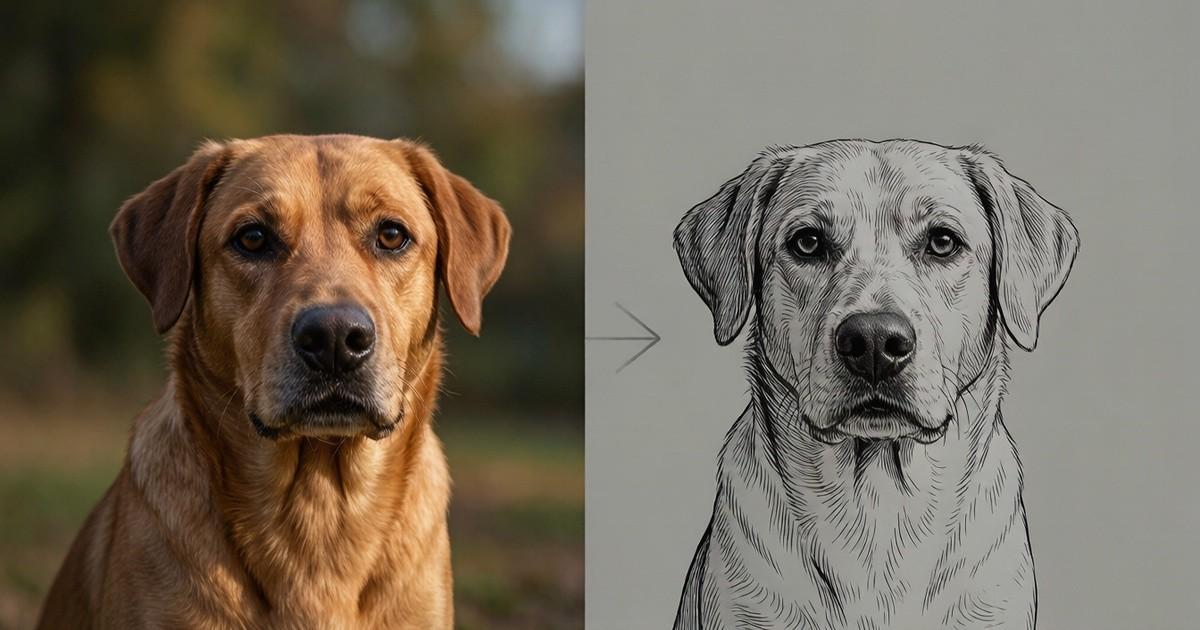
Learn how to convert photo to coloring page for free with PhotoColorify. No sign-up, fast results, and supports PNG, JPG, and WEBP. Try it now. Practical tips.
You have a favorite snapshot of your dog sitting by the window, sunlight catching his fur. You think it would make a wonderful coloring page for your niece who loves animals. But you have no drawing skills, no expensive software, and no time to trace outlines by hand. You open your browser, search for a tool to convert photo to coloring page, and hope for something that just works. That is exactly where PhotoColorify steps in—a free, no-sign-up web tool that turns any clear image into a printable line art in under a minute.
Why Turn a Photo into a Coloring Page?
Coloring is not just for kids. Adults use it to relax, teachers use it for classroom activities, and families use it to create personalized gifts. When you convert photo to coloring page, you preserve a memory in a new, interactive form. A birthday party picture becomes an activity for the guests. A field photo from your last hike becomes a quiet evening project. The process is simple: the tool detects edges and reduces the image to bold, clean lines, removing colors and shading. The result is a black-and-white outline that you can print and color with crayons, markers, or colored pencils.
What Makes a Good Source Photo.
Not every photo will produce a perfect coloring page. The tool works best with images that have clear subjects and distinct edges. A portrait with a plain background works better than a busy street scene. A close-up of a flower is better than a wide shot of a garden. For best results, choose a photo where the main object fills most of the frame. Also, check the resolution: the shorter side of the image should be at least 512 pixels. If your photo is smaller, you may see jagged lines or missing details. The tool supports PNG, JPG, and WEBP files, so most phone and camera images are fine.
Step-by-Step: How to Convert Photo to Coloring Page
Using PhotoColorify takes less than a minute. Here is the full process:
- Go to photocolorify on your browser. No app download is needed.
- Click the upload button and select your image. You can also drag and drop the file.
- Wait for the automatic processing. Generation takes a few seconds to a minute, depending on the image size and complexity.
- Preview the line art. If you like it, download the result. If not, you can adjust the contrast or edge thickness using the simple sliders.
- Print the page or save it for later. Your results are saved for 24 hours, so you can come back to download them again without re-uploading.
The entire process is 100% free, and no registration is required. You do not need to create an account or provide an email address. For readers comparing practical options, photocolorify can provide relevant context. Just upload, wait, and download.
Creative Uses for Your Converted Coloring Pages
Once you convert photo to coloring page, the possibilities are endless. Here are a few ideas to get you started:
- Personalized gifts: Turn a family portrait into a coloring page and frame it with a set of colored pencils. Perfect for grandparents.
- Party activities: At a child’s birthday party, print coloring pages of the birthday child with each guest’s name. Kids love coloring their own version.
- Educational tools: Teachers can convert historical photos or scientific diagrams into coloring pages for lessons. It helps students focus on shapes and details.
- Therapy and relaxation: Adults often find coloring repetitive and soothing. Use your own travel photos to create a personal coloring book.
- Custom cards: Print a small coloring page and fold it into a greeting card. The recipient can color it before reading your message.
Tips for Getting the Best Line Art
Even with a good tool, the output depends on your input. Here are practical tips to improve your results when you convert photo to coloring page:
- Use high contrast: Photos with strong differences between light and dark areas produce clearer lines. Avoid low-light or hazy images.
- Simplify the background: If the background is busy, the line art may look cluttered. Crop the photo to focus on the main subject.
- Adjust settings: PhotoColorify offers controls for line thickness and detail level. For a child’s coloring page, use thicker lines. For an adult’s detailed page, increase the detail.
- Test different photos: Not every image works on the first try. Try two or three variations of the same subject to see which one gives the best outline.
- Check the file format: Stick to PNG or JPG. Avoid screenshots with For readers comparing practical options, photo to line art can provide relevant context. text or watermarks, as those will appear in the line art.
Frequently Asked Questions About Converting Photos
You might wonder about the technical side. Here are answers to common questions:
- Is it really free. Yes, PhotoColorify is 100% free. There are no hidden fees, no watermarks on the output, and no premium tier.
- Do I need to sign up. No registration is required. You can use the tool immediately.
- How long are my files kept. Results are saved for 24 hours. After that, they are deleted from the server. So download your page right away.
- What image formats are supported. PNG, JPG, and WEBP are all accepted.
- What if my photo is too small. The shorter side of the image should be at least 512 pixels. If it is smaller, the tool may not detect edges properly. You can try enlarging the image first, but quality may suffer.
- How long does the conversion take. Generation takes a few seconds to a minute. Larger images take longer.
Why PhotoColorify Stands Out
There are many online converters, but the service is designed with the user in mind. It does not bombard you with ads or ask for your email. It does not limit the number of conversions per day. It does not require you to install software. You simply upload a photo and get a clean line art file. The tool is fast, reliable, and accessible from any device with a browser. Whether you are a teacher preparing a lesson, a parent making a rainy-day activity, or an artist looking for a base sketch, the service delivers consistent results.
Another advantage is the privacy aspect. Because no registration is required, you do not have to worry about your personal data being stored. The tool processes your image and then deletes it after 24 hours. This is a simple, transparent policy that respects your time and your privacy.
Start Your First Conversion Today
You do not need to be an artist to create beautiful coloring pages. With the service, you can turn any cherished photo into a fun, printable activity. The next time you want to make a personalized gift or a unique party favor, remember this tool. It is free, fast, and easy. Just upload your image, wait a few seconds, and download your line art. Then print it, grab some crayons, and enjoy a creative afternoon.
So why wait. Open your favorite photo, go to photo to line art, and see the magic happen. You will be surprised at how simple it is to convert photo to coloring page. Whether it is a pet, a child, a wedding photo, or a scenic view, the service turns it into a canvas for your imagination. Try it now and share your colored masterpiece with friends and family. The tool is always there when you need it, and it never asks for anything in return. That is the beauty of a truly free service.
Remember, the best coloring pages come from photos that mean something to you. So dig through your camera roll, pick a favorite, and let the service do the rest. You will have a new activity in minutes, and you might even discover a new hobby. Happy coloring!
 Deutsch
 English
 Arabic
 French
 Spanish
 Portuguese
 Turkish
 Dutch
Dutch
 Italiano
 Russian
 Romaian
 Portuguese (Brazil)
 Greek
Greek
